
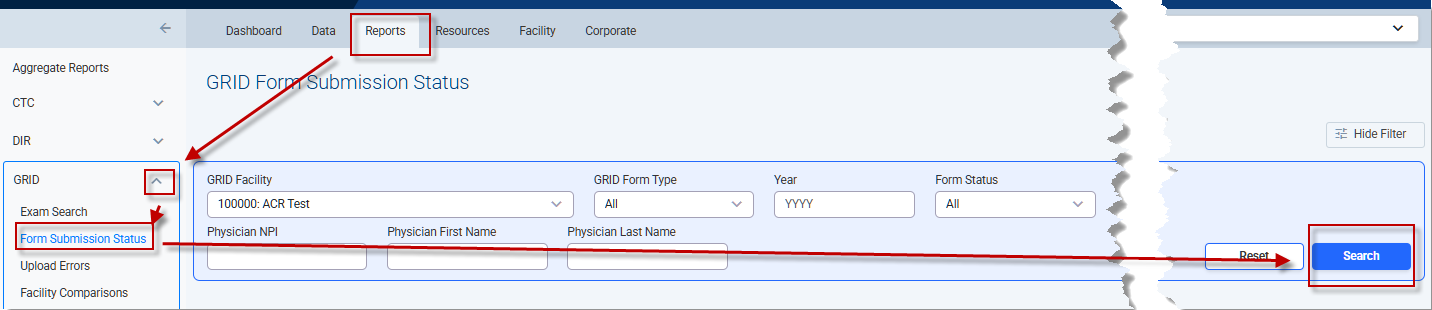
The Form Submission Status Report shows the status and submission date of forms used to submit data to the GRID registry. These reports can help users identify missing or incomplete data submissions. To view the report, click Reports on the top menu of any page in the NRDR portal, click the drop-down arrow for GRID on the left menu, and click Form Submission Status. You have the option of entering search criteria in various fields to restrict the list. If no search criteria are entered, all forms will be listed. Click Search to download the report, which will be in pdf format.
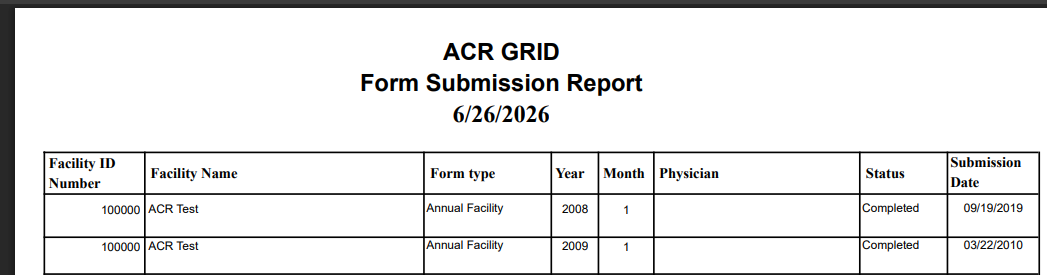
Each report displays:
Facility ID and Name (as determined by the user’s login credentials)
Form Type
Year and Month submitted
Physician Name
Status
Submission Date
Note: All users may view submission reports for their facility.
 | Previous: Available Reports | Next: Quarterly Facility Report |  |