
Catch up on our recent webinar guiding users through the redesigned NRDR portal, launched July 18, 2026, and see how the new interface makes it easier than ever to find and navigate your data.
This recorded session walks through what's changed and just as importantly, what hasn't in the NRDR portal redesign. You'll get a guided tour of the new navigation and layout, a live demo of key portal workflows, and answers to the questions users asked most during the live Q&A. Whether you're a longtime NRDR user getting reoriented or just want a refresher on where things live now, this webinar will help you navigate the new design with confidence.
Materials
After watching this webinar, participants should be better able to:
- Describe the scope of the NRDR portal redesign, including what has changed in navigation and layout and what has remained functionally the same.
- Navigate the redesigned NRDR portal, including key tools and pages such as the Data tab and Tableau reports.
- Identify where familiar features and workflows now live within the new interface.
- Access support resources for questions or issues encountered while adjusting to the new portal design.
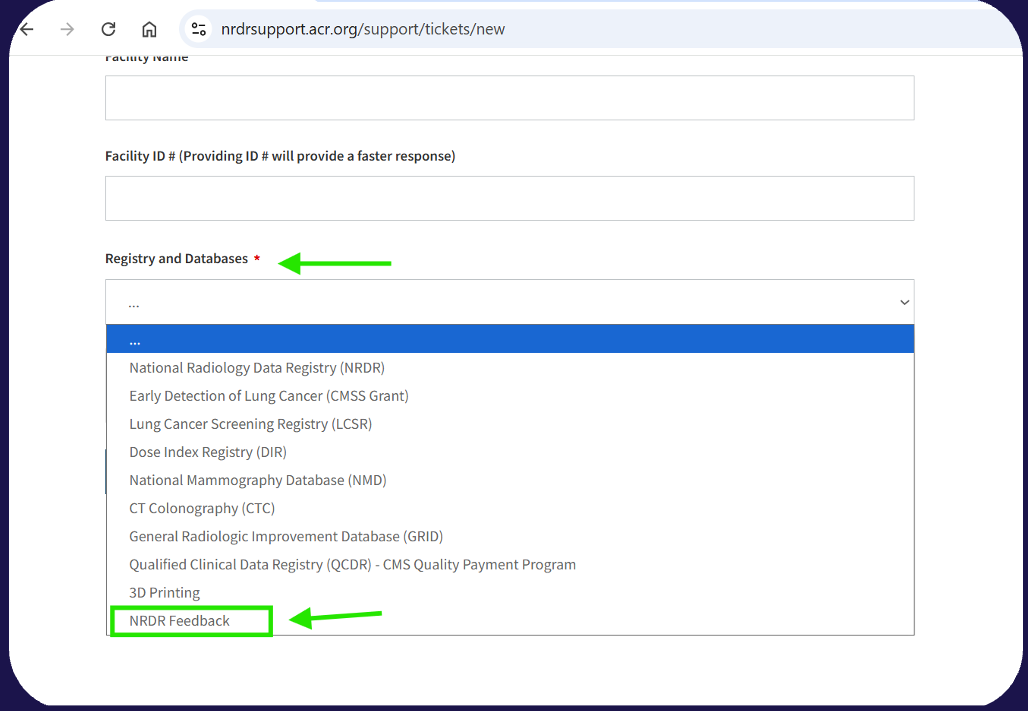
We want to hear from you! Let us know your feedback about NRDR here by selecting NRDR Feedback under Registries and Databases.
Speakers
Bobby Burchard, Lakisha Nelson, and Rishea Johnson
Q&As
Is there a way to export the reports easily into a spreadsheet or to print?
- Yes, for the interactive reports, you will go to the bottom right corner of the Tableau report there is an "Export Data" button which you can then select how you wish to have your report downloaded.
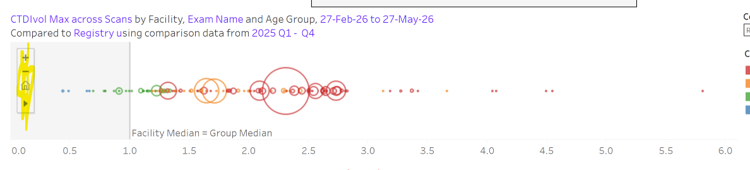
Are we still working with the giant circles that represent data that were difficult to click on?
- Yes, there are now chart controls in the CT Facility Comparison report These appear when the mouse hovers over the chart. A key tip is to hover the mouse over any item in the tool – for example, the triangle (at the bottom of the control) expands to show several “select” controls and if you hover over any one of them you get a tooltip description. As we improve the interface of the reports, we will keep in mind tha ability to drill down on overlapping data points.
Can I add or delete physician data?
- Please use the instructions in the Manage Physicians article to mark physicians as inactive.
Has the file load process changed?
- The process of uploading data has not changed. Only the layout has changed. Please find this feature under the Data tab.
Can you explain how to map DIR exams?
- Information on how to map exams can be found in the Exam and Procedure Name Mapping Resource Guide.
Are there any updates with exam protocol mapping?
- We are working to create a hands-free Exam Name Mapping process for you. Please stay tuned for updates on this initiative.
Can you show us how to upload the MIPS file?
- Please follow the directions in the How to Upload Measure Data to the MIPS Portal article.
Sometimes we seem to get notices when submissions stop being sent while other times it seems we don't. It'd be nice to get a notice if a scanner is regularly sending data but then stops.
- Emails are sent to the Service Users, Facility Administrator and Registry Administrators 14 days and 30days after we stop receiving submissions from scanners. Please ensure you have the right NRDR profile. Information on accounts and profiles can be found here.
Will there be a help or search option to look over new features and questions?
- Yes, we have updated our support articles to reflect the new user interface, and a recording of the interactive demonstration will be included in relevant articles. We are happy to meet with you and your team should you have any questions with the new design.
Under the older version of the LCSR, the patient errors were denoted by an edit assigned by the ACR such as: "L3132" indicating there was a conflicting patient identifier. How does this get resolved?
- These are very common data upload errors. Users may experience this because there is conflicting patient identifiers provided with the exam record submitted to NRDR. NRDR can identify or match the patient existing in the database using one of four identifiers; SSN, other ID, which is likely MRN, new MBIT or old MBIT. For example, if you provide the first exam record with SSN and other ID but later you send a record for this patient using a different MRN # because it's updated in your system, there would be a conflict, so the NRDR system would reject it because it is not matching the existing database values.
Is it possible to add a field to the Exam Detail report for the patient's name? And remove the 12:00:00 AM time stamp in the date of birth field?
- We are not able to add patient name to the Exam Detail report, but will consider removing the 12:00:00 AM time stamp in the date of birth field.
I get a LOT of L3132 errors - almost any time I have any patient identifier that is not either the new MBID or the NRDR patient ID. How can we resolve this?
- To understand the issue, we recommend to search patients in NRDR by every ID you provide for exam record in data file (for example, if you send exam record with SSN and Other ID, search by SSN and then search by Other ID), system must return only one patient ID and both SSN and Other ID must match the values in data file). In case if you got two different patient records returned by your search, you will need to merge these patients into one record.
For Published Aggregate Reports, can a user subscribe to receive automated emails when reports are published? Can a corporate admin or registry or facility admin subscribe users to specific registry and facility published reports?
- Corporate administrators are notified when aggregate reports are made available. We will consider having a customizable alerts and notifications system in a future release.
What is the difference between logging into NRDR and having connect?
- NRDR is where you go to view your reports, and manage physicians and facility/corporate information. ACR Connect is a secure platform sites use to transmit data to us in real time, and manage NRDR patients for CTC, NMD and LCS patients.
In MyApplications, why can't we sort by individual Facilities? The only sortable columns seem to be related to the Corporate and not Facility level.
- Applications are linked to the corporate account which may have multiple facilties. This is a great questions and we will consider adding sort by facility ID in the future.
For user management, why is there no "bulk" action option, such as deleting, or editing email address or phone number, for a given ACRID?
- NRDR cannot bulk edit or delete user profile information such as email addresses or phone numbers because ACRIDs are tied to individual ACR Login accounts managed through Okta. Users are responsible for maintaining their own ACR Login information. NRDR Administrators can remove a user's permissions and access within NRDR, but this only removes their access to the NRDR account. It does not delete the user's ACR Login, ACRID, or profile information, which are managed centrally outside of NRDR.
Did I hear correctly, we can no longer download patients in a registry from the NRDR site? Are there instructions on how to perform this function through ACR Connect?
- Patient management is now done in the NRDR App in ACR Connect. Here are instructions to manage patients in ACR Connect. https://nrdrsupport.acr.org/support/solutions/articles/11000129932-nrdr-app-patient-management.
The "Facility" and "Corporate" tabs have an "expand-condense" arrow for the left-hand menu, but "Data" "Reports" "Resources" don't have this expand-condense all. Can that please be added?
- Thank you, this will be addressed in the next software release!
Are there resources available for those that are new to NRDR and the how-to's? Particularly for staff members that are newer to CT and will be working with the DIR- so they can be the most successful.
- Yes, we recommend checking out the NRDR Startup Guides as they walk you through how to set up your team, get data flowing and utilize the reports. Our customer success team is also readily available to meet with you and your team for detailed walkthroughs and guidance on how to utilize the registries. Please request support to set up a call.